Expert Authority
Free Google Shopping Feed Audit
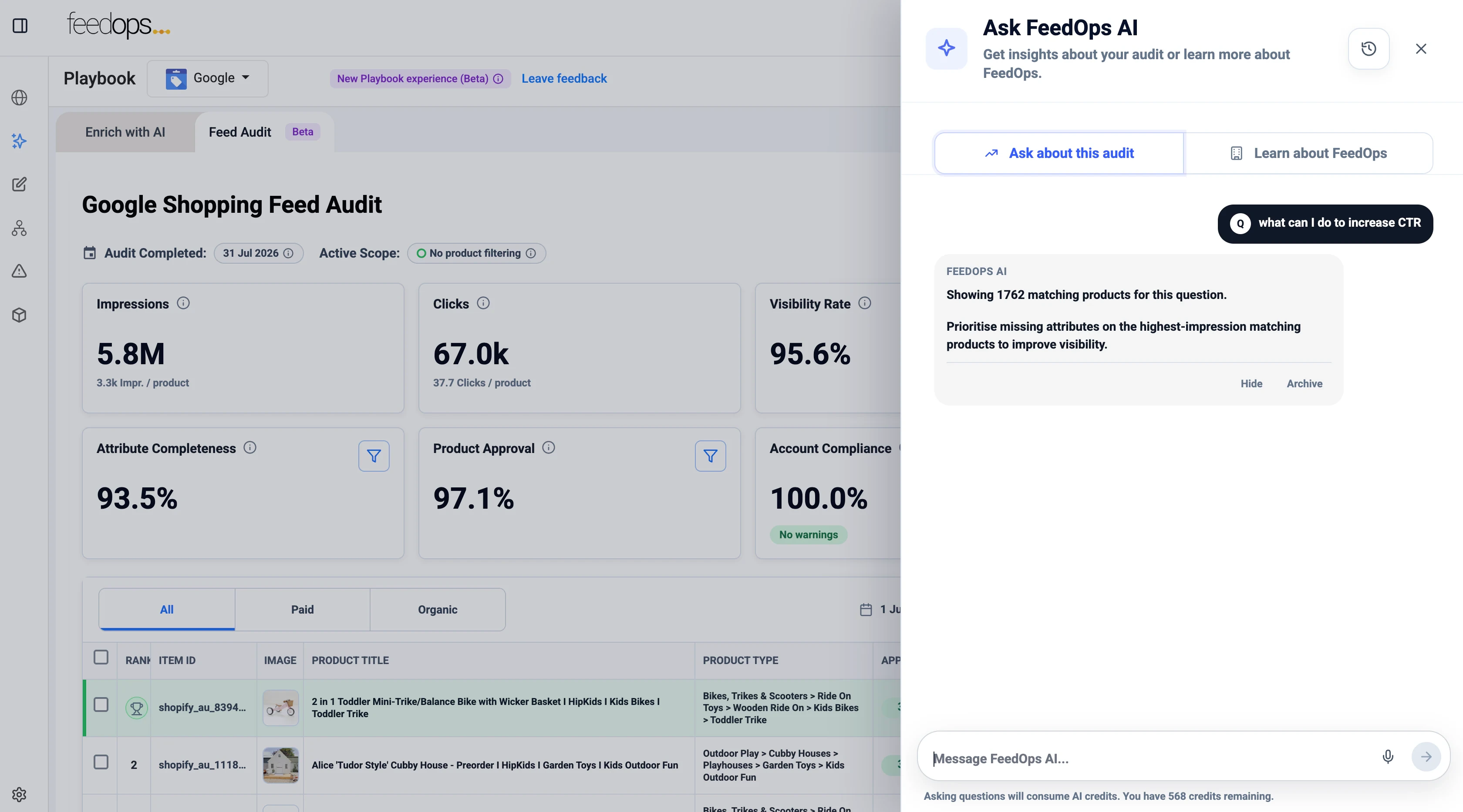
Use the Free Google Shopping Feed Audit to connect your Google Merchant Center and see what is holding back your product visibility, clicks, and conversions. This fully automated audit reviews your Google Shopping feed data to uncover missed opportunities, weak product signals, and gaps that may be limiting both paid and organic performance.
-
Completely free
-
Fully automated
-
No need to change feed providers
-
Join 600+ brands scaling with FeedOps
Stop Leaving Money on the Table
Your product data plays a major role in how often your products appear, how often shoppers click, and how many opportunities you create for conversion. Our Free Google Shopping Feed Audit connects directly to Google Merchant Center and reviews the product data that powers your Shopping performance. You do not need to connect Google Ads. You do not need to move to FeedOps. You can keep your current feed provider and still use the audit.
This is a fully automated audit built for retailers, brands, and agencies that want a clearer view of product data performance.
What You Get
Use the audit to quickly understand what is helping or hurting your product performance in Google Shopping.
Improve Product Visibility
Identify exactly why products aren’t showing up and how to broaden your reach.
Improve Clicks
Whether you’re targeting ROAS, CPA, or full-funnel attribution—we align our feed strategy to your campaign objectives.
Create Conversion Opportunities
No more data errors, disapprovals, or marketplace mismatches. We handle the messy middle so your team can focus on what it does best.
Organic vs Paid Visibility
Compare issues affecting both channels to ensure a holistic growth strategy.
Learn What's Holding You Back
Deep-dive into specific data gaps that are limiting your performance potential.
And much more included in your free comprehensive report.
What the Audit Checks
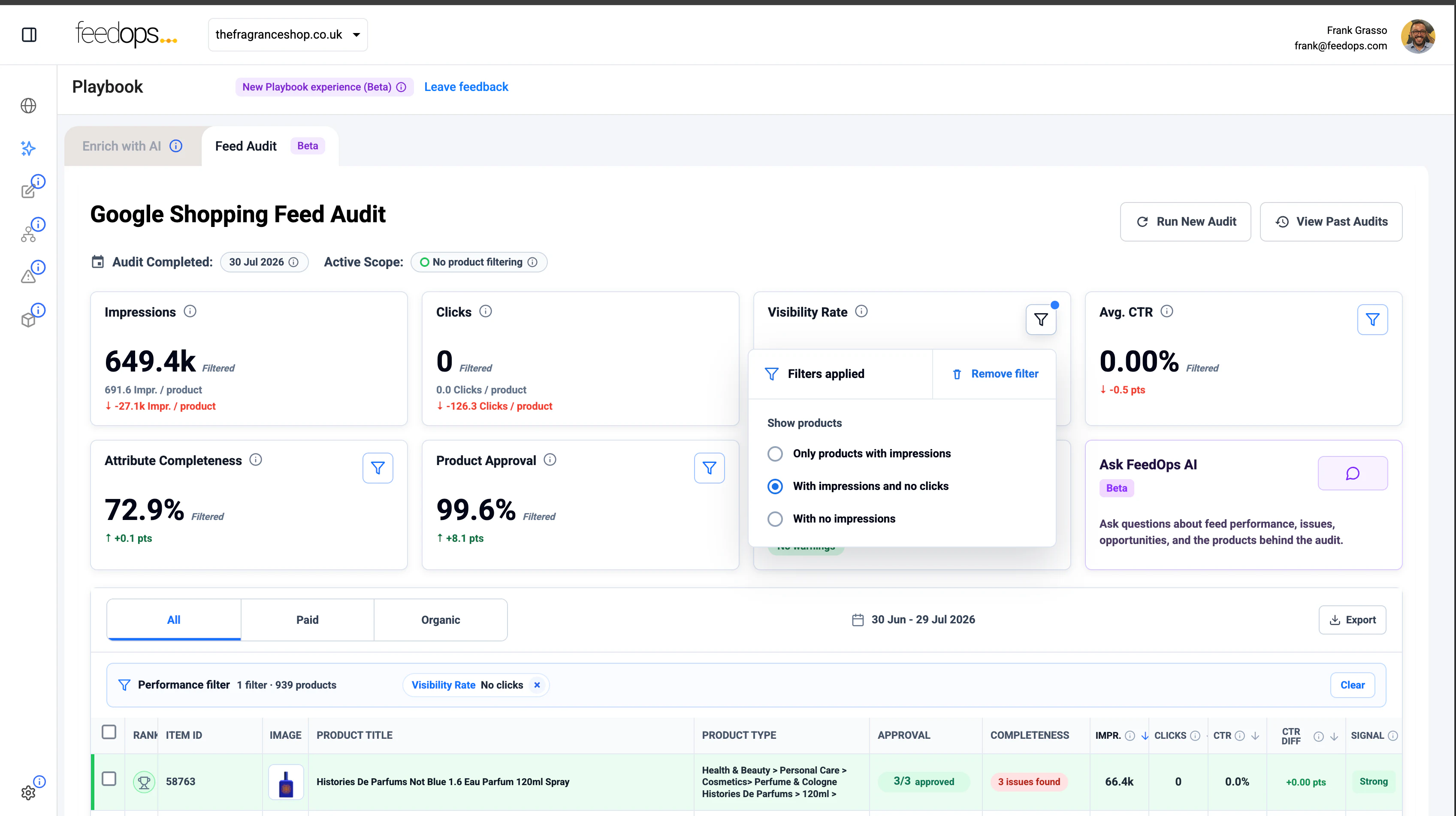
At a glance, you can review:
Visibility Score
Understand how visible your catalogue is likely to be across Google Shopping surfaces.
Zombie Products
Find products getting impressions but no clicks.
No Impressions, No Clicks
Spot products that are not getting seen at all.
Attribute Completeness
Identify missing or weak data that may reduce relevance and visibility.
Organic and Paid Signals
See issues that may affect both free listings and paid Shopping activity.
How It Works
1
Sign up with work email
2
We set up account
3
Connect Google Merchant Center
4
Run audits whenever you like
5
Audit as many websites as you like
6
Invite your team
7
Review stored audit history
Built for Teams
This is not a one-off report.
Once your account is active, you can:
- Run as many audits as you like
- Keep a history of previous audits
- Use the platform with no obligation to upgrade
There are no strings attached.
Built for Retailers, Brands, and Agencies
Whether you are managing one store or many, the audit is designed to be easy to use and easy to share.
Retailers, brands, and agencies are all welcome.
You can use it for your own business, for multiple brands, or across client accounts.
Why Retailers and Agencies Use It
Most teams know feed quality matters. However, many still lack a simple way to see where product data is falling short. This audit gives you a practical view of the issues that can hold back performance, without forcing you to change your current setup. It is useful whether you manage feeds in-house, work with an agency, or already use another provider. Because it is fully automated, it is easy to run audits regularly and track progress over time.
No Google Ads Connection Required
The audit does not rely on Google Ads data. It uses Google Merchant Center as the source of truth, so you can assess the quality and completeness of the product data that powers your Shopping presence. That makes it simple to get started and easy to share across your team.
Request Access
Enter your work email and we will set up your account so you can run audits across as many websites as you like and invite your team.
-
Run unlimited audits.
-
Invite unlimited team members.
-
Store your audit history.
FAQ
Is this really free?
Yes. The Google Shopping Feed Audit is completely free to use.
Is it fully automated?
Yes. The audit is fully automated. Once your account is set up and your Google Merchant Center is connected, the platform reviews your product data automatically.
Do I need to become a FeedOps customer?
No. You do not need to become a FeedOps customer to use the audit.
Do I need to replace my current feed provider?
No. You can keep your existing feed provider and still use the audit.
Do I need to connect Google Ads?
No. The audit does not require a Google Ads connection. It uses Google Merchant Center as the source of truth.
Why does the audit use Google Merchant Center?
Google Merchant Center contains the product data that powers your Google Shopping presence. That makes it the best place to assess visibility, completeness, and potential issues.
Does the audit make changes to Google Merchant Center?
No. The audit is read-only. It does not make any changes to your Google Merchant Center account or product data.
FeedOps only makes changes if you choose to upgrade to a plan that includes optimisation.
Who is this for?
The audit is built for retailers, brands, ecommerce teams, and agencies that want a clearer view of product data health in Google Shopping.
Are retailers welcome?
Yes. Retailers are welcome. Whether you manage one website or many, the audit is designed to help you understand what may be limiting performance.
Are brands welcome?
Yes. Brands are welcome. The audit can help you understand how your product data is performing across your catalogue.
Are agencies welcome?
Yes. Agencies are welcome. You can use the audit across multiple client websites and invite your team members as needed.
Can I run more than one audit?
Yes. You can run as many audits as you like.
Can I use it on more than one website?
Yes. You can run audits across as many websites as you like.
Can I invite my team?
Yes. You can invite all your team members so they can access and review audits with you.
Can I store past audits?
Yes. Past audits are stored, so you can review earlier results and compare progress over time.
Is this a one-off report?
No. This is not a one-off report. You can run audits regularly and keep a history of results.
What does the audit check?
The audit checks key product data signals that may affect Google Shopping performance, including visibility score, products with impressions but no clicks, products with no impressions, and attribute completeness.
What is Visibility Score?
Visibility Score helps you understand how visible your catalogue is likely to be across Google Shopping surfaces.
What are Zombie Products?
Zombie Products are products that get impressions but do not get clicks. They may be showing, but they are not attracting enough shopper interest.
What does No Impressions, No Clicks mean?
This highlights products that are not being seen at all. That can point to issues with product data, relevance, completeness, or overall visibility.
What is Attribute Completeness?
Attribute Completeness shows whether important product data fields are present and complete. Missing or weak attributes can reduce visibility and relevance.
Does the audit help with both paid and organic visibility?
Yes. The audit helps you identify issues that may affect both paid Shopping activity and free listings.
Will the audit tell me what is holding my product data back?
Yes. That is the purpose of the audit. It is designed to help you quickly identify weak signals, missing data, and missed opportunities.
What makes this audit different?
This audit gives you complete SKU coverage across your catalogue.
It does not rely on subjective opinions or spot checks. It uses algorithms and AI to assess your product data consistently, at scale, and in a repeatable way.
Do I need technical skills to use it?
No. The audit is designed to be simple to use and easy to understand.
How do I get access?
Sign up with your work email, and we will set up your account.
Why do I need to use a work email?
We use work emails to help keep access relevant for real businesses, brands, retailers, and agencies.
How long does setup take?
Once you sign up, we set up your account so you can get started as soon as access is ready.
Can I use the audit even if I already have an agency?
Yes. Many businesses use the audit alongside their existing agency or internal team.
Can I use the audit if I manage feeds in-house?
Yes. The audit is useful for in-house ecommerce, digital, and product teams.
Does using the audit commit me to anything?
No. There are no strings attached.
What happens after the audit?
You can review the results, share them with your team, and use them to prioritise improvements in your product data and Shopping setup.
Will FeedOps contact me after I sign up?
We may contact you to help set up access or support your use of the audit, but you are not required to upgrade to FeedOps.
Can I share audit access with clients or stakeholders?
Yes. You can invite relevant team members and stakeholders to review audit results.
Is this only for large retailers?
No. The audit can be used by growing ecommerce businesses, established brands, large retailers, and agencies.
Does this work for one Merchant Center account or many?
It can be used across multiple websites and accounts, which makes it useful for both in-house teams and agencies.
What makes this different from a manual audit?
A manual audit often relies on spot checks and opinion. This audit is fully automated, covers your full catalogue, and gives you a repeatable way to assess feed health over time.
Do I have to upgrade to FeedOps to act on the findings?
No. You can use the audit on its own. Upgrading is optional.
What happens if I want FeedOps to help fix the issues?
If you choose to upgrade to a FeedOps plan with optimisation, FeedOps can then help you take action on the findings.
See What Your Product Data Is Missing
Get free access to the fully automated Google Shopping Feed Audit and start finding the issues that may be holding back visibility, clicks, and conversions.
Work emails only.