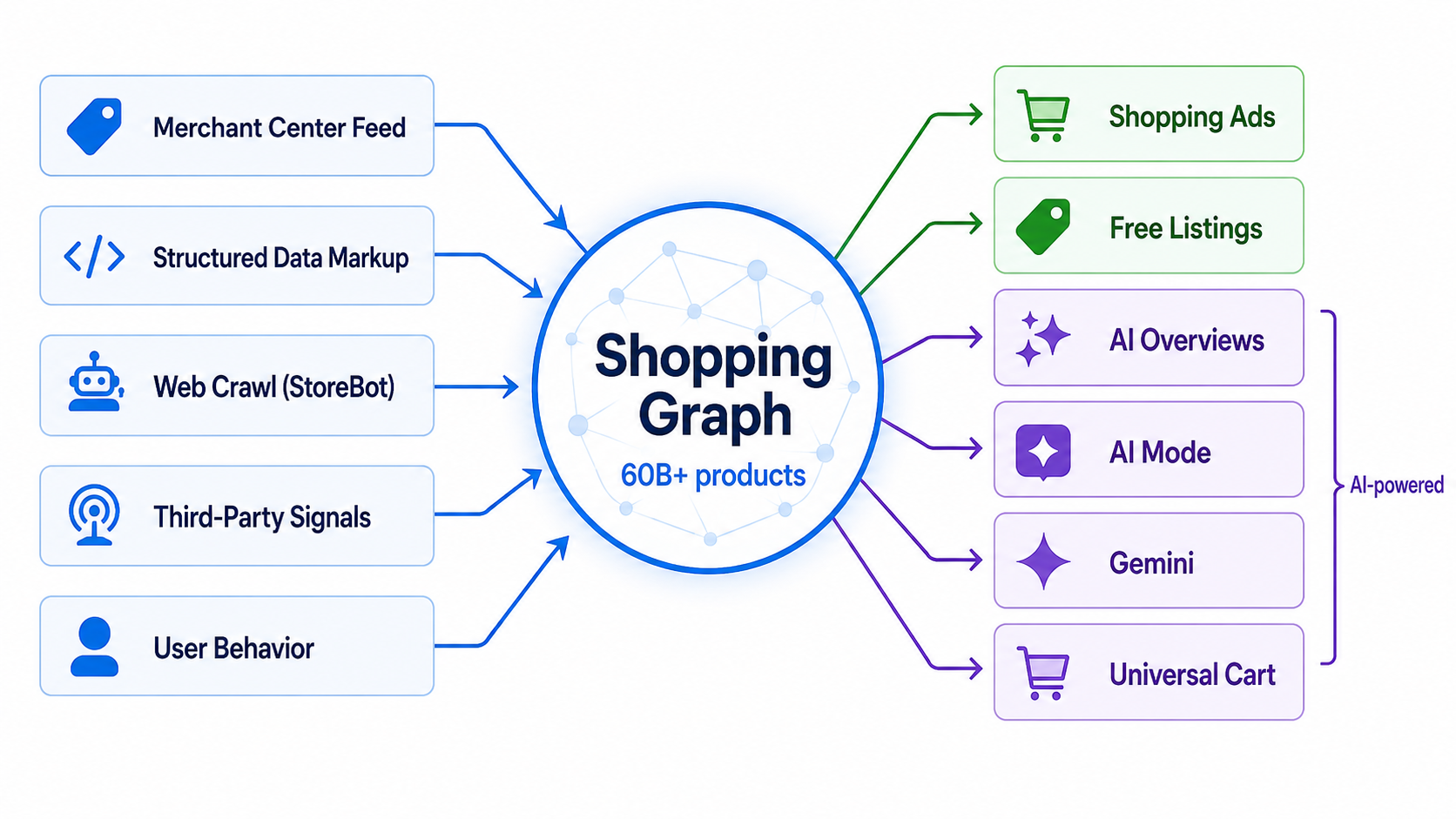
If you manage product feeds for a living, here’s a number that should keep you up at night: 60 billion – That’s how many product listings now live inside the Google Shopping Graph.
The figure comes directly from Google — Vidhya Srinivasan, VP/GM of Ads & Commerce, confirmed the number at Google I/O on May 19, 2026, up from the 50 billion Google had cited earlier in the year. Two billion of those listings update every single hour, according to Google.
Your products are somewhere in that 60 billion. The question is whether Google actually understands them well enough to show them.
Because here’s what most retailers miss: getting your products into the Shopping Graph is not the same as getting them working inside it.
The Shopping Graph doesn’t just store your feed data. It interprets it. It cross-references it. It uses it to decide whether your product deserves to appear in Shopping ads, free listings, AI Overviews, AI Mode, Gemini recommendations, and — as of this week — Google’s new Universal Cart.
Most product feeds were built to pass Merchant Center validation. That’s a very different bar than actually performing inside the Shopping Graph.
This post breaks down what the Shopping Graph actually is, what it reads from your feed, where most feeds fall short, and what you need to fix.
What Is the Google Shopping Graph?
Google’s Shopping Graph is a real-time, AI-powered product knowledge graph — essentially Google’s structured understanding of every product available for purchase on the internet.
Google describes it as a comprehensive dataset that helps Google “understand products, sellers, brands, attributes, prices and availability across the web.” But that undersells what it actually does.
It’s a Knowledge Graph, Not a Database
The Shopping Graph is not a database. It’s a connected intelligence layer. It doesn’t just know that your product exists — it understands what your product is, how it relates to other products, which queries it’s relevant to, and whether the data around it is trustworthy enough to surface to a shopper.
Think of it this way: Google’s regular search index understands web pages. The Shopping Graph understands products.
It knows that a “Nike Air Max 90” in size 10 and white is a specific variant of a broader product line, that it competes with other cushioned running shoes, and that reviews generally praise comfort but note narrow fit.
That level of understanding comes from combining multiple data sources, not just your feed.
Where the Google Shopping Graph Gets Its Data
This is where most retailers make their first mistake: assuming their Merchant Center feed is the only input. It’s not. The Shopping Graph pulls from at least five sources and cross-references them all.
1. Your Merchant Center Product Feed
This is the primary structured data source — where Google gets your titles, descriptions, prices, availability, GTINs, images, and product attributes. It’s the most important input because it’s the most structured.
2. Your Website’s Structured Data Markup
Product schema (JSON-LD) on your product pages gives Google a way to independently verify what’s in your feed.
Google Search Central explicitly states that “providing both structured data on web pages and a Merchant Center feed maximizes your eligibility to experiences and helps Google correctly understand and verify your data.”
3. Google’s Own Web Crawl
Google’s product-specific crawler (known as StoreBot-Google) crawls your product pages directly and extracts whatever it can — pricing, availability, product details, even information from reviews embedded on the page.
4. Third-Party Signals
This includes product reviews from Google Customer Reviews, third-party review platforms like Bazaarvoice and Yotpo, price comparison data, and marketplace listings for the same product.
5. User Behavior Signals
How shoppers interact with your listings — click-through rates, return-to-SERP behavior, conversion patterns — feeds back into how the Shopping Graph evaluates your products over time.
Why Consistency Across All Five Matters
These five sources need to tell a consistent story. Google’s Merchant Center documentation warns that “when key elements don’t match” between your feed and your landing page, products can be disapproved.
Every mismatch — a price difference between your feed and your landing page, an “in stock” flag in your feed for a product that’s actually backordered on your site — can trigger product disapprovals, and persistent mismatches risk account-level suspension.
What the Google Shopping Graph Actually Reads From Your Feed
Not all feed attributes are created equal in the Shopping Graph’s eyes. Below is a framework we use to prioritise feed attributes by their impact on visibility. (Note: this is our editorial framework for thinking about feed priority — Google doesn’t publish an official hierarchy, but the tiers reflect what their documentation emphasises most.)
Tier 1: Identity Attributes (These Determine Whether You Exist)
GTINs (Global Trade Item Numbers) are the single most important identifier in your feed. The GTIN is how Google matches your product to its universal product understanding.
Without a valid GTIN, Google can’t connect your listing to everything else it knows about that product — reviews, price history, competitive pricing, attribute data from other sellers. Google’s own documentation states that “products submitted without any unique product identifiers are difficult to classify and may not be eligible for all Shopping programs or features.” According to GS1 data cited by multiple industry sources, products with valid GTINs see up to 40% higher impressions and 20% more conversions on Google Shopping.
Brand is required for all branded products and is how Google clusters your listing with other sellers of the same product. Keeping brand names consistent across your feed (e.g., always “Nike,” not sometimes “Nike Inc.” or “NIKE”) helps Google match your products accurately.
MPN (Manufacturer Part Number) is required when GTIN isn’t available. It serves as the fallback identifier.
If your identity attributes are wrong or missing, nothing else matters. You’re invisible.
Tier 2: Relevance Attributes (These Determine Where You Show Up)
Product title is the single most important ranking signal for Shopping results. Google parses your title to understand what the product is and who it’s for.
The optimal formula: Brand + Product Type + Key Differentiator (e.g., “Patagonia Men’s Nano Puff Jacket — Lightweight Insulated, Water-Resistant”). Google allows up to 150 characters but only displays roughly 70 in most formats. Front-load the essential information. (We break down the full title optimization process in our Google Shopping product title optimization guide.)
Google Product Category tells the Shopping Graph where your product sits in Google’s product taxonomy.
Going deeper improves query matching. “Apparel & Accessories” is vague. “Apparel & Accessories > Clothing > Outerwear > Down Jackets” is specific enough to matter.
Product type is your own categorization, separate from Google’s taxonomy. It gives Google an additional signal for understanding your product hierarchy and is particularly useful for niche or specialized products. (See our deep dive on how product type works in Google Shopping.)
Description provides secondary keyword and context signals. Google allows up to 5,000 characters. Aim for 500 to 1,000 characters of meaningful content. Include materials, use cases, sizing context, and differentiating features.
Tier 3: Trust and Conversion Attributes (These Determine Whether You Win)
Price and availability must be accurate to the minute, not the day. The Shopping Graph updates two billion listings every hour.
If your feed says $49.99 but your landing page says $54.99, or your feed says “in stock” but the product is actually sold out, Google will disapprove those products — and too many mismatches can trigger an account-level suspension.
Shipping information answers the question “when will this arrive?” Google’s April 2026 spec update added new product-level shipping attributes including handling cutoff time and minimum order value, signaling that Google is placing increasing weight on delivery data.
Include shipping cost, maximum handling time, and transit time. Missing shipping data limits your eligibility for surfaces where delivery speed is a key consideration.
Product images need to be high-quality. Google’s current minimum is 100×100 pixels for non-apparel and 250×250 pixels for apparel. However, Google announced in its April 2026 spec update that the minimum is increasing to 500×500 across all categories, with warnings active since April 14, 2026 and enforcement beginning January 31, 2027. Google recommends at least 800×800 pixels for best display quality.
Industry data suggests that image quality optimisation can produce 15–25% higher click-through rates in Shopping campaigns, with white-background images generally outperforming cluttered alternatives.
The same April 2026 spec update also introduced a new video link attribute, allowing merchants to submit product videos. Video serving begins June 30, 2026.
Reviews and ratings feed directly into the Shopping Graph’s product understanding. Products with valid GTINs can be matched to review data submitted through Google Customer Reviews or third-party integrations (Bazaarvoice, Yotpo, etc.), and strong review signals are widely considered to improve placement — though Google has not published specific thresholds for ratings or review counts.
Tier 4: Enrichment Attributes (These Are Where You Pull Ahead)
These are the attributes most feeds leave empty — and where the gap between “adequate” and “high-performing” feeds becomes visible.
Color, size, material, pattern, age group, and gender are technically optional for many categories but functionally essential. Every empty optional attribute is a query you’ll never match. When someone asks Gemini “show me navy blue wool overcoats in large,” only products with all three attributes populated can surface.
Product highlights and detailed descriptions give AI systems more natural language context to work with.
Certifications and compliance data (e.g., “USDA Organic,” “Energy Star,” “Fair Trade Certified”) increasingly matter for filtered searches, both in traditional Shopping and AI-driven surfaces.
Custom labels don’t directly affect Shopping Graph ranking, but they determine how you can segment and bid on your products in campaigns — effectively controlling which products get the most budget.
The 7 Feed Gaps Costing Most Retailers Visibility
Based on common patterns across Merchant Center accounts, here are the most frequent and costly mistakes.
The Identity and Relevance Gaps
Gap 1: Missing or incorrect GTINs. This is the number-one feed problem. Some merchants skip GTINs entirely. Others submit incorrect ones (using internal SKUs instead of actual barcodes).
Either way, the product becomes unmatchable in the Shopping Graph. Google’s product data specification mandates GTINs for all products that have one assigned by the manufacturer and warns that “products submitted without any unique product identifiers are difficult to classify and may not be eligible for all Shopping programs or features.”
Gap 2: Generic titles that don’t match search behavior. “Blue Shirt” loses to “Ralph Lauren Men’s Classic Fit Oxford Shirt — Blue, Size M.”
Most merchants write titles for their own inventory system, not for the way shoppers search. The fix: pull your Google Ads Search Terms Report and compare high-converting queries against your current product titles.
Gap 3: Shallow category assignment. Stopping at level two or three in Google’s product taxonomy is like telling Google “I sell clothes.” Going deeper is like saying “I sell men’s insulated down jackets.”
The specificity directly impacts which queries you appear for
The Trust and Completeness Gaps
Gap 4: Price and availability mismatches between feed and landing page. Google crawls your pages independently. When what it finds doesn’t match your feed, products get disapproved.
This is especially consequential for AI-powered surfaces, where the system needs high-confidence data to generate recommendations.
Gap 5: Empty optional attributes. Color, material, size, gender, age group — technically optional, practically essential.
Each empty field is a filter or query your product can’t match. In an AI-driven Shopping experience where the user asks conversational, attribute-rich questions, empty fields mean you’re excluded from the answer.
Gap 6: Feed-only strategy with no on-page structured data. Your Merchant Center feed and your Product schema markup are two separate inputs into the Google Shopping Graph.
Running one without the other means Google can’t cross-verify your data. Google Search Central explicitly recommends using both: “Providing both structured data on web pages and a Merchant Center feed maximizes your eligibility to experiences and helps Google correctly understand and verify your data.”
Gap 7: Stale feeds. If your feed updates once a day but your prices or inventory change more frequently, you’re feeding the Google Shopping Graph outdated information.
With two billion listings updating hourly, staleness is a competitive disadvantage. Real-time or near-real-time feeds through API or automated feed management are becoming the baseline.
Why This Matters More Now: The AI Commerce Layer
Everything above would matter even if the Shopping Graph only powered traditional Shopping ads and free listings. But in 2026, the Shopping Graph is the foundation for something much bigger.
AI Search Surfaces That Read From the Google Shopping Graph
AI Overviews now include product recommendations powered by the Google Shopping Graph. When someone searches “best waterproof hiking boots for wide feet,” the AI Overview pulls products directly from the Shopping Graph to generate its answer.
Products with incomplete data are far less likely to be cited.
AI Mode is Google’s conversational search experience, where users ask multi-turn shopping questions. According to multiple industry analyses, AI Mode’s recommendation algorithm prioritises products with comprehensive attributes, accurate pricing, and quality images.
In AI Mode, product data quality functions as the primary ranking signal — structured attribute completeness and intent match matter more than traditional keyword and bid optimisation.
Gemini acts as a conversational shopping agent. As Google describes it, users can go “from brainstorming to browsing” right within a chat, getting shoppable product listings, comparison tables, and pricing from across the web — all pulled from the Shopping Graph.
The experience works like asking a knowledgeable friend for a recommendation — but that “friend” can only recommend products it fully understands.
The New Agentic Shopping Layer
Universal Cart — announced by Google at I/O on May 19, 2026 — lets shoppers add products from anywhere on Google (Search, Gemini, YouTube, Gmail) into a single cart. Google says people already shop across its platforms more than a billion times a day, all powered by the Shopping Graph.
The cart uses AI to find deals, track price drops, flag compatibility issues, and surface hidden savings. Products with complete, accurate Shopping Graph data get surfaced inside these cart recommendations. Products with gaps don’t.
Universal Commerce Protocol (UCP) is the protocol layer that enables AI agents to interact with product catalogs, check inventory, compare options, and complete purchases across retailers.
Google co-developed UCP with Shopify and has since added Walmart, Target, Visa, Mastercard, American Express, and Stripe. UCP is expanding to Canada and Australia in the coming months, with YouTube integration in the U.S. and new verticals like hotel booking and local food delivery on the roadmap.
For UCP to work with your products, the Google Shopping Graph needs accurate, real-time data.
The Takeaway
The pattern is unmistakable: every new AI shopping surface Google launches reads from the Shopping Graph. The Shopping Graph reads from your feed.
The quality of your feed data now determines your visibility across an expanding number of surfaces, not just Shopping ads.
What to Do About It: A Practical Priority List
If you’re reading this and realizing your feed has gaps, here’s where to start — in order of impact. (For the full playbook, see our Google Shopping feed optimization guide.)
Start Here: The High-Impact Fixes
First, audit your product identifiers. Check GTIN coverage across your catalog. Every product that has a manufacturer-assigned GTIN should have it in your feed.
Use GS1’s GTIN validation tools — including the Check Digit Calculator and the GEPIR lookup tool — to verify accuracy. This single fix unlocks more downstream improvements than anything else.
Second, rewrite your top-performing product titles. Pull your Search Terms Report. Identify the queries driving the most conversions. You can also do this with custom prompts using FeedOps AI.
Restructure titles to match: Brand + Product Type + Key Differentiator. Start with your top 20% of SKUs by revenue.
Third, deepen your category assignments. Assign the most specific category possible for every product. This is tedious manual work, but it directly improves query matching. It can also be automated using custom LLMs in FeedOps.
Then: The Structural Improvements
Fourth, fill in every optional attribute. Run a coverage report on your feed. Identify which optional attributes — color, material, size, gender, age group, condition — are empty.
Set a target of 95%+ attribute completion for your top SKUs. You can run a shopping feed audit in Feedops and then use the enrich with AI feature to fill these in.
Fifth, align your feed with your on-page data. Implement Product schema (JSON-LD) on every product page. Ensure that price, availability, GTIN, brand, and key attributes match between your feed and your structured data markup. Google recommends using both for maximum eligibility across Shopping experiences.
Sixth, increase your feed update frequency. If you’re updating daily, move to every few hours. If you can, implement real-time feeds via Content API in Feedops.
The Google Shopping Graph rewards freshness and penalises stale data — Google’s own documentation warns that lag between feed and website data causes “data inconsistency issues” and recommends enabling automatic item updates.
Seventh, build your review signals. If you’re not enrolled in a review program that feeds into Google, start.
Products with valid GTINs can be matched to review data from approved aggregators, and strong review signals are widely reported to improve placement across Shopping surfaces.
The Bottom Line
The Google Shopping Graph is no longer a backend system that powers Shopping ads. It’s the central nervous system for how Google understands, evaluates, and recommends products across every surface — from traditional search to AI Overviews to Gemini conversations to the new Universal Cart.
Most product feeds were built to avoid Merchant Center disapprovals. That’s the floor, not the ceiling. The retailers winning visibility in 2026 are the ones treating their feed as a strategic asset: complete, accurate, enriched, and constantly updated.
The gap between “my feed passes validation” and “my feed actually performs inside the Google Shopping Graph” is where visibility is won or lost. And as Google continues to expand the number of AI-powered surfaces that read from the Google Shopping Graph, that gap will only get more expensive to ignore.
Frequently Asked Questions
What is Google's Shopping Graph?
Google’s Shopping Graph is a real-time, AI-powered product knowledge graph. According to Google, it contains over 60 billion product listings (as confirmed at Google I/O 2026), with 2 billion updates per hour. It combines data from Merchant Center feeds, website structured data, web crawls, reviews, and user behavior to understand products, sellers, brands, attributes, prices, and availability. It powers Shopping ads, free listings, AI Overviews, AI Mode, Gemini shopping recommendations, and Google’s Universal Cart.
How does Google's Shopping Graph rank products?
Google has not published a definitive list of Google Shopping Graph ranking factors, but its documentation emphasises data completeness (particularly GTINs and product identifiers), title relevance to search queries, attribute richness, price and availability accuracy, data consistency between feed and landing pages, review signals, and image quality. Industry analyses report that in AI-powered surfaces like AI Mode and Gemini, structured attribute completeness matters more than traditional ad bidding — though Google has not officially confirmed this distinction.
What data does Google read from my product feed?
Google reads identity attributes (GTIN, brand, MPN), relevance attributes (title, category, product type, description), trust attributes (price, availability, shipping, images, reviews), and enrichment attributes (color, size, material, pattern, age group, gender, certifications). Google Search Central confirms that feed data is cross-referenced with on-page structured data, and Google’s Merchant Center documentation shows that web crawl data is also used for verification.
Why are my Google Shopping listings not showing?
Common causes include missing or incorrect GTINs (Google warns that products without unique identifiers “may not be eligible for all Shopping programs”), price or availability mismatches between your feed and landing pages (which trigger product disapprovals), generic product titles, shallow category assignments, missing required attributes, and low image quality. The current image minimum is 100×100 for non-apparel and 250×250 for apparel, rising to 500×500 for all products by January 31, 2027.
How does the Google Shopping Graph affect AI Overviews and AI Mode?
AI Overviews and AI Mode pull product recommendations from the Google Shopping Graph. Industry sources report that products need comprehensive attribute data, accurate pricing, quality images, and strong review signals to appear in AI-generated answers — with data quality functioning as the primary ranking signal. However, it’s worth noting that Google has not officially confirmed Merchant Center as a direct AI Mode ranking signal, though the shared infrastructure of the Shopping Graph makes feed quality a practical prerequisite for AI visibility.
What is Google's Universal Commerce Protocol (UCP)?
UCP is an open standard co-developed by Google and Shopify that creates a common language for AI agents to interact with merchant product catalogs, check inventory, compare options, and complete purchases. Major retailers (Walmart, Target) and payment networks (Visa, Mastercard, Stripe) have adopted it. For UCP to work with your products, the Shopping Graph needs accurate, real-time data from your feed.
How often should I update my product feed?
At minimum, daily. Ideally, every few hours or in real-time via API. The Google Shopping Graph updates 2 billion listings per hour, and Google’s own documentation warns that lag between feed and website creates “data inconsistency issues” that affect product visibility.
What's the difference between Google Merchant Center and the Google Shopping Graph?
Google Merchant Center is where you submit your product feed — it’s the data input layer. The Shopping Graph is the intelligence layer that combines your Merchant Center data with structured data from your website, web crawl data, reviews, and other signals to build a comprehensive understanding of your product. Merchant Center is one input; the Shopping Graph is the system that uses all inputs to determine visibility.
Do I need both a Merchant Center feed and structured data markup on my product pages?
Yes. Google Search Central explicitly recommends using both: “Providing both structured data on web pages and a Merchant Center feed maximizes your eligibility to experiences and helps Google correctly understand and verify your data.” When both sources agree on price, availability, GTINs, and key attributes, Google can verify your data more confidently. Running one without the other increases the risk of disapprovals and limits your eligibility for Shopping experiences.
Why are my products not appearing in Google AI Overviews or AI Mode?
AI-powered surfaces appear to have a higher data quality bar than traditional Shopping ads. Industry analyses suggest that the most common reasons products don’t appear include missing GTINs (which prevent the Shopping Graph from matching your product to its broader understanding), incomplete attributes (especially color, size, and material — which AI needs to answer conversational queries), price or availability mismatches between your feed and landing page, and missing or low-quality images. While the exact AI Mode ranking algorithm is not public, data completeness and accuracy appear to be the key determinants.
What is a GTIN and why does Google require it?
A GTIN (Global Trade Item Number) is the barcode number assigned by a product’s manufacturer — the 12-digit UPC in the US or 13-digit EAN internationally. Google requires GTINs because they’re how the Shopping Graph matches your product listing to its broader understanding of that product. Without a valid GTIN, Google can’t connect your listing to reviews, price history, competitive pricing, or attribute data from other sellers. Google states that “products submitted without any unique product identifiers are difficult to classify and may not be eligible for all Shopping programs or features,” and GS1 data shows that products with valid GTINs see up to 40% higher impressions and 20% more conversions. You can verify your GTINs using GS1’s Check Digit Calculator and GEPIR lookup tool.
How do I check if my Google Shopping feed has problems?
Start by checking the Diagnostics tab in Google Merchant Center for disapprovals and warnings. Then audit three things most merchants miss: GTIN coverage (what percentage of your products that have manufacturer-assigned GTINs actually include them in your feed), attribute completeness (how many optional fields like color, material, size, and gender are empty), and data consistency (whether your feed prices and availability match what’s on your landing pages). The Shopping Graph cross-references your feed with your website, so mismatches can lead to product disapprovals and reduced visibility.
You can also run a Free Google Shopping Feed Audit in FeedOps.
How does Google's Shopping Graph work with Google Gemini for shopping?
What is Google's Universal Cart and how does it affect my products?
Universal Cart was announced by Google at I/O on May 19, 2026. It lets shoppers add products from anywhere across Google — Search, Gemini, YouTube, and Gmail — into a single persistent shopping cart. The cart uses AI to find deals, track price drops, flag compatibility issues between items, and surface hidden savings. For your products to appear in Universal Cart recommendations and AI-powered deal alerts, the Shopping Graph needs complete and accurate data from your feed.
Can I improve my Google Shopping rankings without increasing my ad budget?
The Google Shopping Graph powers both paid Shopping ads and free listings, and free listing visibility is based on data quality rather than bid amount. Improving your product titles to match how people actually search, adding GTINs to every product that has one, filling in optional attributes like color, material, and size, deepening your Google Product Category assignments, and ensuring your feed data matches your landing pages — all of these improve your visibility in free listings and AI surfaces without additional ad spend. Google Search Central recommends sharing product data through both structured markup and Merchant Center feeds to maximise eligibility across all Shopping experiences.
FeedOps helps retailers and agencies fix the feed gaps that cost visibility across Google Shopping, AI Overviews, and Gemini. If your feed passes validation but still underperforms, talk to us.