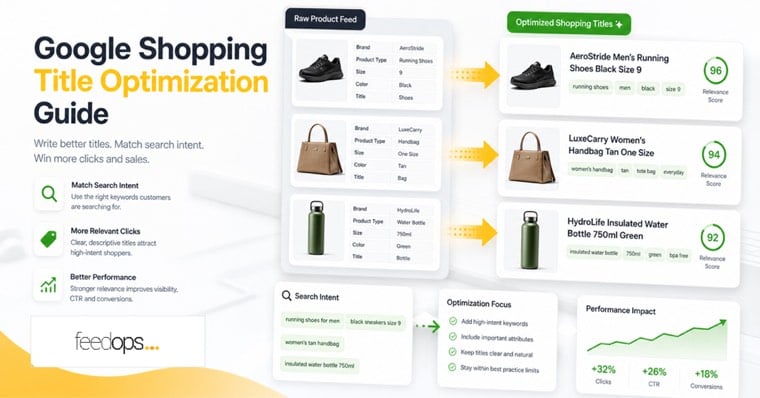
Quick answer
What is Google Shopping title optimization?
Google Shopping title optimization is the process of improving product titles in your product feed so Google can understand what each item is, match it to relevant searches, and show shoppers the details that make them more likely to click.
A compliant title gets your product submitted. An optimized title helps the product win better impressions, clicks, and conversions.
Official Google references
Best answer for Google Shopping title optimization
The best Google Shopping title is clear, accurate, and built from the attributes shoppers use to search and compare products. A strong default structure is Brand + Product Type + Model or Range + Key Attribute + Color + Size or Variant, with the most important terms placed near the front.
- Goal: help Google match the product to relevant searches.
- Best practice: use real product attributes, not repeated keywords.
- Measure: impressions, click-through rate, conversion rate, search term coverage, and ROAS.
Why titles matter
Your title is one of the strongest matching signals in Google Shopping.
Google Shopping does not use keywords in the same way as Search campaigns. Instead, Google reads your product feed and decides which searches your products are relevant for. The product title is one of the strongest signals in that matching process, and Google says a specific, accurate title helps show your product to the right customers in ads and free listings.
If your title says Hiking Boots, Google has limited context. If it says Columbia Men's Waterproof Hiking Boots Brown Size 11, Google can understand the product type, brand, gender, feature, color, and size.
Optimized titles improve three parts of performance
- Visibility: More relevant search terms can trigger your products.
- Click-through rate: Shoppers see the details they care about before they click.
- Conversion quality: Clear titles reduce wasted clicks from shoppers looking for something else.
Core framework
Build product titles from the details shoppers actually use to decide.
The best title structure depends on what shoppers care about in your category. Use this formula as a starting point, then adjust it for your catalog, product data, and Google Merchant Center requirements.
Base formula:
Brand + Product Type + Model or Range + Key Attribute + Color + Size or Variant
For lesser-known brands, lead with the product type instead of the brand. For high-intent branded searches, put the brand first. For technical products, the model number may need to appear early.
Title templates
Use category-specific templates instead of one formula for every product.
Create templates by category so you can scale Google Shopping title optimization across a full product catalog without making every title sound identical.
| Category | Recommended structure | Example |
|---|---|---|
| Apparel | Brand + Gender + Product Type + Material or Feature + Color + Size | Adidas Women's Lightweight Running Jacket Blue Medium |
| Footwear | Brand + Gender + Product Type + Model + Color + Size | Nike Men's Running Shoes Air Zoom Pegasus 40 Black Size 10 |
| Electronics | Brand + Size or Model + Product Type + Key Specs | Samsung 55 Inch QLED 4K Smart TV HDR Dolby Atmos |
| Home Goods | Brand + Material + Product Type + Style + Size or Capacity | IKEA Solid Oak Dining Table Scandinavian Style 6 Seater |
| Beauty | Brand + Product Type + Benefit + Size or Shade | CeraVe Hydrating Facial Cleanser Dry Skin 473ml |
Optimization process
Step-by-step guide to optimizing Google Shopping titles.
1. Start with search intent
Before rewriting titles, identify the words customers actually use. Look at search term reports, product keyword research, site search data, category names, Google Shopping product type values, and high-performing marketplace listings.
2. Group the useful title attributes
- Product type: running shoes, queen mattress, wireless earbuds
- Brand: Nike, Sealy, Samsung
- Attributes: waterproof, leather, 4K, organic, wide fit
- Audience or use: men's, kids, beginners, office, camping
- Variants: size, color, capacity, pack size, model
3. Front-load the most important terms
Put the strongest words near the beginning. Shoppers often scan only the first part of a title, and Google uses the title to understand relevance.
Weak: Size 10 Black Air Zoom Pegasus 40 Running Shoes by Nike
Stronger: Nike Men's Running Shoes Air Zoom Pegasus 40 Black Size 10
4. Keep titles clear and scannable
Google's title attribute allows up to 150 characters, but shorter, cleaner titles often perform better. Aim to make the first 60 to 70 characters carry the core product meaning, then use the remaining space for useful secondary attributes.
Examples
Compliant, optimized, and AI-optimized titles are not the same thing.
| Title type | Example | Best use |
|---|---|---|
| Compliant | Running Shoes Size 10 | Enough to submit, but usually too thin for strong Shopping performance. |
| Optimized | Nike Men's Running Shoes Air Zoom Pegasus 40 Black Size 10 | Best default for structured Google Shopping title optimization. |
| AI-Optimized | Nike Air Zoom Pegasus 40 Men's Black Running Shoes Lightweight Comfort Size 10 | Useful when you want natural long-tail phrases while keeping titles accurate. |
Good: Apple MacBook Air 13 Inch Laptop M2 256GB SSD Silver
Too vague: MacBook Air
Too stuffed: Apple MacBook Air Laptop Apple Laptop MacBook Computer Silver M2 Laptop
Common mistakes
Avoid the title problems that quietly limit Shopping performance.
- Using website titles without feed optimization. Website titles are often built for design and navigation, not Shopping relevance.
- Duplicating titles across variants. If every hoodie has the same title, Google and shoppers cannot easily distinguish color, size, or style.
- Putting low-value words first. Starting with size, SKU, or internal naming can waste the most important title space.
- Keyword stuffing. Repeating the same term makes the title harder to read and can hurt click-through rate.
- Leaving out decision-making attributes. Missing color, material, size, compatibility, or model details can cost you high-intent searches.
- Using promotional language. Keep price, sale claims, shipping promises, and hype out of the product title.
AI workflow
AI can scale title optimization, but it needs rules and verified data.
AI is useful when you have too many SKUs to rewrite manually. It can generate cleaner titles, add natural language descriptors, and create long-tail variations from product attributes. The key is to give AI structured rules rather than letting it invent details, and to keep the title work aligned with wider Google Shopping feed optimization.
A safe AI workflow
- Clean the source fields: brand, product type, color, size, material, model, and category.
- Set a title formula for each category.
- Give AI rules for maximum length, tone, banned words, and required attributes.
- Prevent hallucinations by allowing only attributes that exist in the feed.
- Review a sample set before publishing at scale.
- Measure performance by product group, category, and search term coverage.
Want help deciding which title improvements will move performance first?
Book a free product feed demoLaunch checklist
Use this checklist before pushing optimized titles live.
FAQ
Frequently asked questions about Google Shopping title optimization.
What is Google Shopping title optimization?
Google Shopping title optimization is the process of improving the product title field in your shopping feed so Google can better understand the product and match it to relevant shopper searches.
Why is the product title so important in Google Shopping?
The product title is one of the strongest feed signals Google uses to understand what an item is. A clear title can improve search matching, click-through rate, and the quality of traffic your Shopping ads receive.
What is the best Google Shopping title format?
A strong starting format is Brand + Product Type + Model + Key Attribute + Color + Size or Variant. The best order depends on the category and how shoppers search for that product.
Should every Google Shopping title start with the brand?
Not always. If the brand is well known, lead with the brand. If shoppers are more likely to search by product type, lead with the product type and include the brand later in the title.
How long should a Google Shopping title be?
Google allows long product titles, but the first 60 to 70 characters are usually the most important because they are more likely to be visible. Put the most important search terms and product details near the front.
Should Google Shopping titles match my website product titles?
They do not have to match exactly. Website titles often need to be clean for shoppers on the product page, while Shopping feed titles can include more structured attributes such as size, color, gender, material, model, or compatibility.
Can I use the same title for every product variant?
No. Variant titles should usually include the attributes that make each product different, such as size, color, pack size, material, or model. Duplicate titles make it harder for Google and shoppers to tell variants apart.
What attributes should I include in a Google Shopping title?
Include attributes shoppers use to decide, such as brand, product type, model, size, color, gender, material, capacity, compatibility, age group, use case, or key feature. Only include attributes that are accurate for the product.
Should I include keywords in Google Shopping titles?
Yes, but naturally. Use the terms shoppers actually search for, especially product type and meaningful attributes. Avoid repeating the same keyword several times because keyword stuffing can reduce readability and click-through rate.
Does keyword stuffing help Google Shopping titles?
No. Keyword stuffing usually makes titles harder to read and less trustworthy. Google Shopping title optimization should focus on clarity, relevance, and useful product attributes, not repetition.
Do optimized titles help Performance Max campaigns?
Yes. Performance Max uses product feed data to understand and match products. Better titles can help Google identify what each product is, who it is relevant for, and which searches may be a better fit.
Can title optimization improve ROAS?
Title optimization can support better ROAS by improving search relevance and reducing wasted clicks. It is not the only factor, but it is one of the most important feed changes for Shopping and Performance Max campaigns.
Can Google Shopping title optimization increase impressions?
Yes. If a title is too vague, Google may not match it to enough relevant searches. Adding accurate product types and attributes can help products qualify for more high-intent search queries.
Can Google Shopping title optimization improve click-through rate?
Yes. Shoppers are more likely to click when the title clearly matches what they searched for and includes decision-making details such as brand, product type, model, color, size, or key feature.
How often should I update Google Shopping titles?
Review titles when products change, new variants are added, search trends shift, seasonal demand changes, or important products have low impressions or weak click-through rates. High-value products should be reviewed more often.
Should I optimize every product title at once?
Not necessarily. Start with high-value products, best sellers, high-margin products, disapproved or underperforming products, and categories with strong search demand. Then scale templates across the rest of the catalog.
How do I measure whether title optimization worked?
Track changes in impressions, click-through rate, conversion rate, search term coverage, cost per conversion, and ROAS. Compare performance before and after changes at the product or category level.
Can AI write Google Shopping titles?
Yes, but AI should work from verified product feed data and clear rules. It should not invent attributes, benefits, compatibility, sizes, or materials that are not present in the source data.
How should AI be used for Google Shopping title optimization?
Use AI to apply category templates, clean title structure, add natural language descriptors, and scale title improvements. Combine AI with rules, feed validation, and human review for important products.
What is an AI-optimized Google Shopping title?
An AI-optimized title uses structured product data plus natural phrasing to create a clear, searchable title. It may include useful long-tail descriptors, but it should still stay accurate and easy to read.
Are long-tail keywords useful in Google Shopping titles?
Yes. Long-tail phrases can help products match more specific searches, such as size, color, material, model, use case, or audience. These searches often show stronger buying intent than broad terms.
Should I include color and size in Google Shopping titles?
Yes, when color and size are important purchase attributes or product variants. Including them helps shoppers identify the right item and helps Google distinguish similar products.
Should I include product type in every Google Shopping title?
Usually, yes. Product type tells Google and shoppers what the item actually is. A title that only contains a brand or model number may be too vague unless the model is widely recognized.
Should I include model numbers in Google Shopping titles?
Include model numbers when shoppers search by model, especially for electronics, appliances, parts, tools, and technical products. For fashion or home goods, model numbers are often less important than product type and attributes.
Should I include promotional words like sale or free shipping?
No. Keep promotional claims, sale language, shipping claims, and hype out of product titles. Use approved promotion fields, sale price fields, or other feed attributes instead.
Can better titles help free listings as well as ads?
Yes. Clear, structured product titles can help both paid Shopping ads and free listings because both depend on Google understanding product feed data accurately.
What is the difference between product title and product type?
The product title is the customer-facing name of the item in the feed. Product type is a separate taxonomy field that helps organize products. Both should be accurate, but the title is more visible to shoppers.
Can title optimization fix poor campaign performance?
It can help significantly, especially when products have low impressions or weak search relevance. For best results, pair title optimization with strong product descriptions, images, categories, pricing, and campaign structure.
What is the biggest mistake retailers make with Google Shopping titles?
The biggest mistake is sending website product names directly into Google Shopping without adding the attributes shoppers search for. Titles that are too vague often miss valuable search demand.
Do titles need to be different for each sales channel?
Often, yes. Google Shopping, marketplaces, social commerce, and website SEO can each benefit from slightly different title structures. A feed management workflow lets you tailor titles by channel without changing the website title.
Can FeedOps help with Google Shopping title optimization?
Yes. FeedOps helps ecommerce teams audit product feeds, improve title structure, apply scalable templates, use AI safely, and identify feed issues that may be limiting Google Shopping and Performance Max results.