
- >
- Learning >
- From Raw Data to Optimized Feed
Raw Data to an Product Feed Optimization
Understand how the data in your store becomes a complete, optimized, and sales-ready product feed. You’ll see how each transformation stage improves visibility, targeting, and performance across AI-powered ad platforms and marketplaces. You’ll also learn how FeedOps automates this process using large language models trained specifically for ecommerce.

What You’ll Learn:
- How raw store data becomes the foundation of your feed — and why incomplete titles, descriptions, and attributes limit your visibility from the start.
- What makes a feed “valid” in Google, Microsoft, Meta, TikTok, Amazon, and ChatGPT Shopping — and how passing platform requirements unlocks eligibility for ads and listings. (Stage 2: Valid Feed)
- How optimised titles, attributes, and categories improve targeting and reduce wasted spend — and how AI enrichment makes your data clearer for machine-learning systems.
- What separates a compliant feed from a truly sales-ready feed — and how enriched, structured data boosts ranking, CTR, ROAS, and marketplace conversions.
- How FeedOps automates the full journey from raw data to high-performing product listings using large language models trained for ecommerce. (How FeedOps Powers This Transformation)
- Why great feeds drive better performance across ads, marketplaces, and organic discovery — turning product data into a competitive advantage.
Introduction
Every online store begins with raw product data. Titles, descriptions, prices, SKUs, and images sit quietly inside your ecommerce platform. On their own, this data helps a shopper choose a product on your website. But when you want to advertise or list products on Google Shopping, Microsoft Ads, Meta, Amazon, TikTok, or ChatGPT Shopping, that raw data is not enough.
Ad platforms and marketplaces need structured, mapped, error-free information. They use this information to understand your products, match them to search intent, and place them where buyers are most likely to click or convert. A product feed becomes the translation layer that turns your website data into a format these platforms can understand.
The better that translation is, the better these systems perform. That is why this lesson focuses on the entire transformation journey—from Raw Data → Valid Feed → Optimized Feed → Sales-Ready Feed.
Stage 1: Raw Data
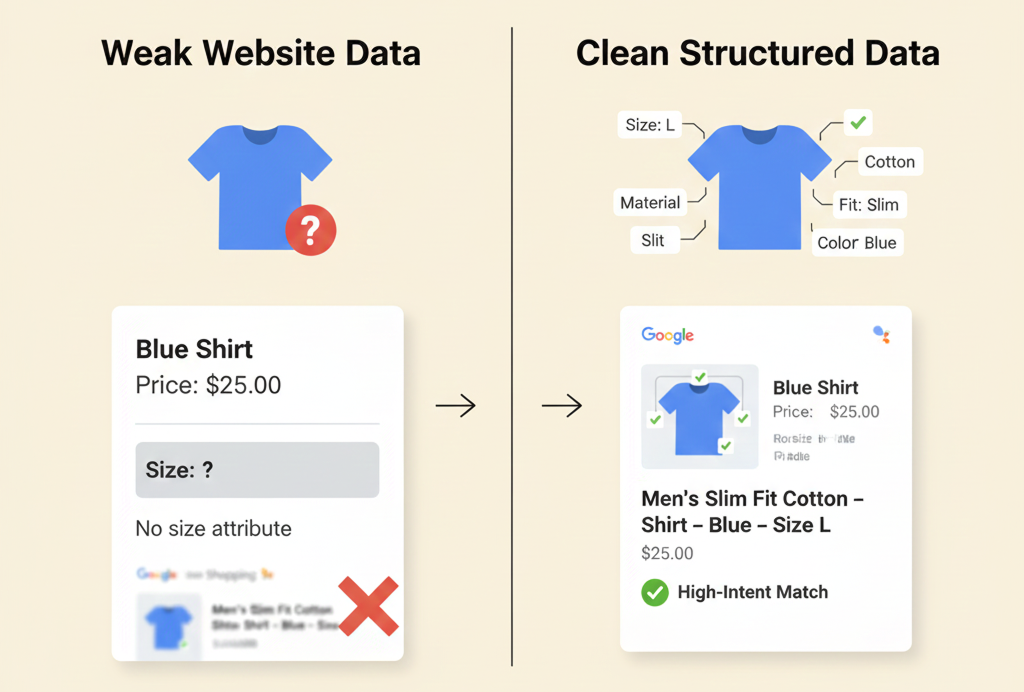
Raw data is the information pulled directly from your ecommerce platform. It includes the fields the merchant created when they added the product to the store. At this stage, the data is messy, inconsistent, and often incomplete.
What Raw Data Usually Looks Like
- Titles written for humans, not algorithms (“Fridge Model 400”).
- Descriptions focused on brand tone, not product details.
- Missing attributes such as color, size, material, GTIN, pattern, or product type.
- Images that vary in size, background quality, and clarity.
- Prices and availability that change without syncing to external channels.
- Category names based on the merchant’s internal structure, not platform taxonomies.
Raw data works well enough for a website. But AI-powered ad systems expect structure, accuracy, and completeness.
Why Raw Data Is Not Enough for Growth
AI advertising platforms rely on attributes to understand your product. Performance Max, for example, uses signals like brand, material, size, price, color, and product type. Missing or vague information causes poor matching. That leads to wasted spend, irrelevant clicks, and fewer conversions.
Marketplaces face an even steeper requirement. Amazon and eBay expect strict category mapping, detailed item specifics, and structured variation sets. If these are missing, your listing won’t appear in filters or search results.
The Role of FeedOps at This Stage
FeedOps ingests your store data and identifies what’s missing. Our system analyses titles, descriptions, categories, and product attributes and flags weak or incomplete entries. This stage highlights the foundation you’re working from.
Raw data sets the baseline. Everything after this point improves clarity, accuracy, and intent alignment.
Stage 2: Valid Feed
A Valid Feed is the first major transformation. It means your data now meets platform requirements and passes error checks. Think of this stage as becoming “legible” to ad platforms and marketplaces.
What “Valid” Means
Every platform—Google, Microsoft, Meta, Amazon, TikTok—has its own rules. These rules define what is required, what is optional, and what is forbidden.
A Valid Feed:
- Includes required attributes like Title, Description, Image Link, Availability, and Price.
- Uses allowed formats (numbers, currency, capitalization).
- Maps categories correctly.
- Passes error checks inside Merchant Center or marketplace dashboards.
- Shows a clean diagnostic report with low or no disapprovals.
- Syncs new data automatically.
Why This Matters
Ad platforms cannot show products that fail validation. Even one missing field can trigger disapproval.
Validity ensures your products appear where shoppers are looking. That includes:
- Google Shopping ads
- Free listings
- Amazon category placements
- Microsoft Copilot product cards
- Facebook and Instagram Shops
- TikTok Shop
- ChatGPT Shopping results
Without a Valid Feed, nothing else works.
Transition to Optimization
A Valid Feed solves compliance. But a valid feed is not an optimized feed. It is only structured enough for platforms to accept it—not enough to win.
This is where optimization begins.
Stage 3: Optimized Feed (Product Feed Optimization Complete)
-
Once the feed is valid, the next stage aligns your content with campaign intent. Optimization makes your data clearer, richer, and more relevant. This stage directly impacts impressions, clicks, CTR, CPC, ranking, and ROAS.
How Optimization Works
Optimization adds intelligence to your feed. You enhance data based on:
- Search intent
- Competitor signals
- Product types and categories
- Pricing context
- Campaign structure
- Channel requirements
- Merchant goals (sales, discovery, clearance, local visibility)
Optimized feeds refine the information AI systems use to match your product to real buyers.
Core Product Feed Optimization Includes
- Stronger product titles (brand + product type + key attributes).
- AI-enriched attributes such as material, pattern, fit, capacity, or wattage.
- Granular product types for keyword expansion.
- Clear variant attributes (e.g., “Black”, “XL”, “Energy Rating 4 Star”).
- Better image selection.
- Custom Labels aligned to business goals.
- Mapping categories to platform-approved taxonomy.
- Cleaning inconsistencies (e.g., “blk” → “Black”).
Examples
Raw Title: Fridge Model 400
Optimized Title: Westinghouse 400L Top Mount Fridge – White, Frost Free, Energy Rating 4 Star
With richer detail, PMax can match the product to buyers searching for:
- 400L fridge
- white top mount fridge
- frost-free fridge
- Westinghouse refrigerator
This improves relevance and reduces wasted spend.
FeedOps at This Stage
FeedOps uses fine-tuned large language models to enrich your feed. We fill missing attributes, rewrite product titles, correct categories, and apply consistent rules.
Our Playbook lets you target specific goals, such as:
- Boosting high-margin categories
- Increasing visibility for slow-moving products
- Improving Local Inventory Ads
- Preparing marketplace listings for strict taxonomies
This is where data begins to work for your advertising.
Stage 4: Sales-Ready Feed
What Makes a Feed “Sales-Ready”
A Sales-Ready Feed includes:- Complete attributes with no gaps
- Titles built around how customers search
- Correct category mapping
- Clean item specifics for marketplaces
- Updated availability and pricing
- High-quality images
- Custom Labels aligned with strategy
- SEO-friendly structured data
- Local inventory attributes
- Rich variant data for filtering and ranking
Why This Changes Everything
A Sales-Ready Feed strengthens performance across your entire marketing stack. For ads:- Better match quality
- Lower CPC
- Higher CTR
- More conversion-ready traffic
- Less waste
- Higher search ranking
- Better filter placement
- Richer detail pages
- Improved customer trust
- Fewer returns
- Stronger structured data
- Better page understanding
- Richer AI-driven shopping signals
AI Matching and Remarketing
With richer product-level attributes, platforms can build more accurate signals around:- Price sensitivity
- Style preference
- Feature interest
- Recency
- Seasonality
- Local availability
How FeedOps Powers This Transformation
FeedOps automates the entire journey:
1. Raw Data Ingestion
We pull your store data and run a complete audit. Missing attributes, weak titles, inconsistent categories, and structural problems are flagged.
2. Valid Feed Generation
We fix compliance issues and ensure your data meets platform requirements.
3. Optimization with AI
We enrich product information by:
- Filling missing attributes
- Generating optimized titles
- Detecting incorrect categories
- Enhancing descriptions
- Producing consistent structure
4. Sales-Ready Outputs
Your final feed is optimized for:
- Google Shopping
- Microsoft Ads
- Meta
- TikTok
- Amazon
- eBay
- ChatGPT Shopping
- Local Inventory Ads
Summary
A product feed is not a static file. It evolves through four essential stages:
- Raw Data — what you have.
- Valid Feed — what platforms accept.
- Optimized Feed — what aligns with intent.
- Sales-Ready Feed — what wins.
The final output drives better visibility, lower costs, and stronger sales across every digital channel.
FeedOps automates the transformation end-to-end. With the right data foundation, AI-powered advertising becomes predictable, efficient, and profitable.
FAQ: What is a Product Data Feed
What is product feed optimization?
Product feed optimization is the process of transforming raw ecommerce product data into a structured, enriched, and performance-ready feed that ad platforms and marketplaces can easily understand, rank, and display. It goes beyond basic compliance to improve visibility, targeting, and conversions.
Why isn’t raw store data enough for ads and marketplaces?
Raw store data is written for human shoppers, not algorithms. Titles are often vague, attributes are missing, categories don’t match platform taxonomies, and data is inconsistent. AI-powered platforms rely on structured attributes to match products to intent—without optimization, performance suffers.
What is the difference between a valid feed and an optimized feed?
A valid feed meets platform requirements and passes error checks, allowing products to be listed or advertised.
An optimized feed enhances titles, attributes, categories, and structure to improve relevance, ranking, CTR, ROAS, and marketplace conversions. Valid feeds get approved; optimized feeds win.
Why does feed optimization improve AI performance?
AI systems learn from product attributes such as brand, material, size, color, price, and product type. Optimized feeds provide clearer signals, enabling better matching, smarter bidding, improved remarketing, and reduced wasted spend.
What makes a feed “sales-ready”?
A sales-ready feed is fully enriched, structured, and aligned to commercial goals. It includes complete attributes, optimized titles, correct taxonomy, real-time inventory and pricing, high-quality images, and strategic custom labels—giving platforms everything they need to convert demand into sales.
How does FeedOps automate product feed optimization?
FeedOps automates the entire journey:
Audits raw store data
Fixes compliance and validation issues
Uses ecommerce-trained large language models to enrich titles and attributes
Maps categories correctly per platform
Syncs pricing, inventory, and availability
Outputs optimized feeds for ads, marketplaces, and AI shopping surfaces
Which channels benefit from product feed optimization?
Optimized feeds improve performance across:
Google Shopping & Performance Max
Microsoft Ads & Copilot
Meta & Instagram Shops
TikTok Shop
Amazon & eBay
ChatGPT Shopping
Local Inventory Ads
Take the Quiz
Check your understanding of how product feeds power AI-driven eCommerce ads.